
What Is Lazy Loading? A Comprehensive Guide to Website Performance Optimization
- Published on






What Is Lazy Loading?
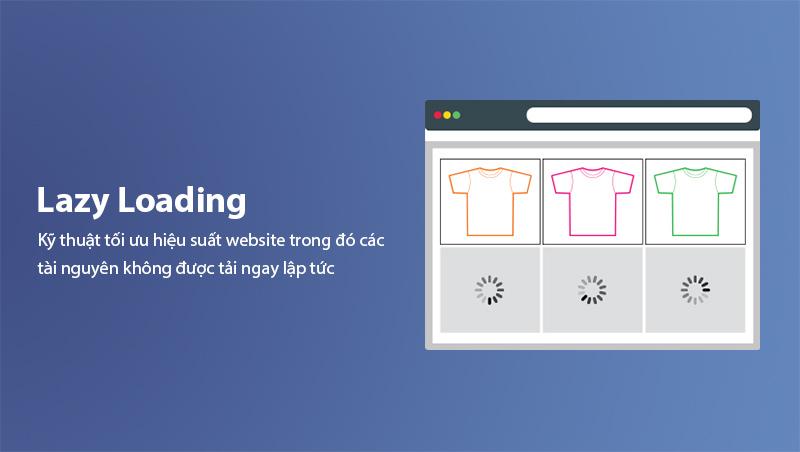
Lazy Loading is a performance optimization technique in which resources such as images, videos, iframes, or other elements are not loaded immediately when the web page opens. Instead, these resources are only loaded when the user scrolls the page to the position where they appear in the viewport.
This technique helps reduce initial page load time, saves bandwidth, and significantly improves user experience, especially on mobile devices with limited internet connections.
Why Is Lazy Loading Important?
In an era where users expect extremely fast page load times, Lazy Loading has become one of the essential optimization techniques. According to Google research, 53% of users will leave a website if the page load time exceeds 3 seconds. This demonstrates the critical importance of optimizing page load speed.
Real-world example: An e-commerce site with 100 high-quality product images can be several megabytes in size. If all images load simultaneously, users will have to wait very long. With Lazy Loading, only the images visible on the initial screen are loaded, making the page load much faster.
Key Benefits of Lazy Loading:
- Reduced initial page load time: Users can see the main content faster.
- Bandwidth savings: Only what users actually view is loaded.
- Improved user experience: Faster page response, reduced bounce rate.
- Improved SEO rankings: Page speed is a key ranking factor according to Google's algorithm updates.
To learn more about the relationship between page speed and SEO, check out our article on Website Speed Optimization.
How Does Lazy Loading Impact SEO?
The Lazy Loading technique has a close relationship with SEO through various aspects. Google has clearly stated that page speed is an important ranking factor, and Lazy Loading is one of the most effective ways to improve this.
Core Web Vitals and Lazy Loading
Core Web Vitals is a set of metrics that Google uses to evaluate user experience on websites, including [Largest Contentful Paint (LCP)], [First Input Delay (FID)], and [Cumulative Layout Shift (CLS)]. Lazy Loading plays a crucial role in improving these metrics.
- Largest Contentful Paint (LCP): Measures the time it takes to load the largest element visible on the page. Lazy Loading helps reduce initial page size, thereby improving LCP scores.
- First Input Delay (FID): Measures the first response time of the page. When pages load faster, users can interact sooner.
- Cumulative Layout Shift (CLS): Measures the amount of layout shift. Improper Lazy Loading can cause CLS issues if appropriate placeholder sizes are not used.
Important note: You should read our article on What Are Core Web Vitals to learn more about optimizing these metrics.
Impact on Search Rankings
When websites load faster, Core Web Vitals scores improve, and SEO rankings on Google also improve. This is especially important in the competitive landscape of search engine results pages (SERPs).
Additionally, when users have a better experience with your website, they stay longer, engage more, and have lower bounce rates. All of these factors are considered by Google when ranking websites.
SEO Considerations for Lazy Loading Images
An important issue to note is that when using Lazy Loading for images, you need to ensure search engines can still crawl and index these images. To do this:
- Use the loading="lazy" attribute in the img tag (this is Google's recommended method).
- Ensure the alt text attribute is filled in and accurately describes the image content.
- Do not use display: none to hide images because search engines may skip them.
You can learn more about optimizing images for SEO in our article on Image SEO.
How Lazy Loading Works
To understand Lazy Loading better, you need to grasp the technical mechanism behind it. Basically, Lazy Loading uses JavaScript to track the user's scroll position and only loads resources when they are about to appear in the viewport.
Basic Working Mechanism
The Lazy Loading process works as follows:
- Initialization: When the page loads, JavaScript sets up event listeners to track scroll events.
- Position monitoring: JavaScript continuously calculates the position of elements relative to the viewport (the visible area of the browser).
- Load on demand: When an element is about to enter the viewport, JavaScript starts loading the resource (usually by assigning a value to the src attribute).
- Resource cleanup: After the resource is loaded, the event listener can be removed to save memory.

Implementation Methods
There are many ways to implement Lazy Loading for your website, from using simple HTML attributes to complex JavaScript libraries:
1. Using the loading="lazy" Attribute (Recommended)
This is the simplest method and is recommended by Google. You just need to add the loading="lazy" attribute to the img tag:
<img src="image.jpg" loading="lazy" alt="Image description" />
Advantages:
- No JavaScript required
- Supported by most modern browsers
- High and reliable performance
2. Using JavaScript Intersection Observer API
This method allows for more flexible control over the Lazy Loading process:
const observer = new IntersectionObserver((entries) => {
  entries.forEach((entry) => {
    if (entry.isIntersecting) {
      const img = entry.target;
      img.src = img.dataset.src;
      observer.unobserve(img);
    }
  });
});
Advantages:
- Supports older browsers
- Highly customizable control
- Can be applied to various resource types
3. Using JavaScript Libraries
If you need advanced features or broader browser support, you can use libraries such as lazysizes, lozad.js, or yall.js.
Detailed Implementation Guide
Implementing Lazy Loading correctly is crucial to ensure optimization effectiveness and avoid potential issues. Below is a step-by-step guide to implementing Lazy Loading for your website.
Implementing Lazy Loading for Images
Images are typically the most resource-heavy elements on a website. Lazy Loading images can reduce initial page load time by 50-80%.
Method 1: Using Native HTML Attribute
<img src="image.jpg" loading="lazy" alt="Image description" width="800" height="600" />
Important note: Always include width and height attributes to prevent Cumulative Layout Shift (CLS). This is one of the most common mistakes when implementing Lazy Loading.
Method 2: Using JavaScript with Intersection Observer
document.addEventListener('DOMContentLoaded', function () {
  const lazyImages = document.querySelectorAll('img[data-src]');

  const imageObserver = new IntersectionObserver((entries, observer) => {
    entries.forEach((entry) => {
      if (entry.isIntersecting) {
        const img = entry.target;
        img.src = img.dataset.src;
        img.removeAttribute('data-src');
        imageObserver.unobserve(img);
      }
    });
  });

  lazyImages.forEach((img) => {
    imageObserver.observe(img);
  });
});
With this method, you need to use data-src instead of src in HTML:
<img data-src="image.jpg" src="placeholder.jpg" alt="Description" class="lazy" />
Implementing Lazy Loading for Videos
Videos are one of the heaviest resources on a website. Lazy Loading videos helps save significant bandwidth and page load time.
Using preload Attribute
<video preload="none" poster="video-poster.jpg">
  <source src="video.mp4" type="video/mp4" />
</video>
Using JavaScript to Load Video on Demand
const videoObserver = new IntersectionObserver(
  (entries) => {
    entries.forEach((entry) => {
      if (entry.isIntersecting) {
        const video = entry.target;
        video.src = video.dataset.src;
        video.load();
        videoObserver.unobserve(video);
      }
    });
  },
  { rootMargin: '200px' }
);
Implementing Lazy Loading for Iframes
If your website embeds content from external sources like YouTube, Google Maps, or other websites, Lazy Loading iframes is an effective way to improve page load speed.
<iframe src="https://www.youtube.com/embed/xxx" loading="lazy" title="Video title"> </iframe>
You can learn more about optimizing Google Maps in our article on What Is Google Maps API.
Common Lazy Loading Mistakes to Avoid
Although Lazy Loading offers many benefits, if implemented incorrectly, it can cause serious issues affecting both user experience and SEO. Below are the most common mistakes and how to fix them.
Mistake 1: Not Setting Image Dimensions
This is the most common mistake when implementing Lazy Loading. When images haven't loaded, the browser doesn't know their size, leading to layout shifts when images finish loading.
How to fix:
<!-- Correct: Always set dimensions -->
<img src="image.jpg" loading="lazy" alt="Description" width="800" height="600" />

<!-- Wrong: No dimensions -->
<img src="image.jpg" loading="lazy" alt="Description" />
Mistake 2: Excessive Lazy Loading
Some websites implement Lazy Loading for everything, including resources above the fold. This can slow down the page instead of speeding it up.
How to fix:
- Only apply Lazy Loading to elements below the fold (not immediately visible).
- Use the loading="eager" attribute for images above the fold.
<!-- Images above the fold -->
<img src="hero-image.jpg" loading="eager" alt="Hero" />

<!-- Images below -->
<img src="content-image.jpg" loading="lazy" alt="Content" />
Mistake 3: Using Inappropriate Placeholders
Using placeholders that are too small or not having placeholders at all can lead to poor user experience.
How to fix:
- Use skeleton screens to display the layout before content loads.
- Ensure placeholders have the correct aspect ratio as the original images.
Mistake 4: Not Handling Unsupported Browsers
Although most modern browsers support Lazy Loading, some users still use older browsers.
How to fix:
if ('loading' in HTMLImageElement.prototype) {
  // Browser supports native Lazy Loading
  document.querySelectorAll('img[loading="lazy"]').forEach((img) => {
    img.src = img.dataset.src;
  });
} else {
  // Browser doesn't support - load all images
  document.querySelectorAll('img').forEach((img) => {
    img.src = img.dataset.src || img.src;
  });
}
Lazy Loading vs Eager Loading Comparison
To better understand Lazy Loading, we need to compare it with the opposite method: Eager Loading. Each method has its own advantages and disadvantages, suitable for different situations.
| Criteria | Lazy Loading | Eager Loading |
|---|---|---|
| Load Time | Only loads when needed (when entering viewport) | Loads everything at once when page opens |
| Initial Page Load Time | Faster | Slower |
| Bandwidth Usage | More efficient | More resource-intensive |
| User Experience | Better (faster page response) | Can be slow with many images |
| Best For | Pages with many images, product listings | Landing pages, homepage |
When to use Lazy Loading:
- Websites with many images (blogs, portfolios, e-commerce)
- Long product listings or articles
- Pages with embedded videos
- E-commerce websites with many products
When to use Eager Loading:
- Important landing pages
- Homepage with limited number of images
- Pages where users typically scroll down immediately
- "Hero" images at the top of the page
Tools and Plugins for Lazy Loading
If you're using popular CMS platforms like WordPress, implementing Lazy Loading becomes extremely simple with the support of many free tools and plugins.
Lazy Loading Plugins for WordPress
- WP Rocket: Comprehensive website optimization plugin, including Lazy Loading for images, videos, and iframes.
- Lazy Load by WP Rocket: Specialized Lazy Loading plugin, lightweight and easy to use.
- Smush: Image optimization plugin with built-in Lazy Loading feature.
- Autoptimize: Code optimization plugin with Lazy Loading options.
Lazy Loading Testing Tools
- Google PageSpeed Insights: Checks website performance and recommends Lazy Loading improvements.
- GTmetrix: Analyzes page load speed and monitors Lazy Loading effectiveness.
- Lighthouse: Google's comprehensive audit tool, including Lazy Loading evaluation. Learn more in our article on What is Google Lighthouse?
You can learn more about checking website speed in our article on How to Check Website Speed.
Optimizing Lazy Loading for Different Platforms
Lazy Loading in React
In React, you can use the react-lazy-load-image-component library to implement Lazy Loading easily:
import { LazyLoadImage } from 'react-lazy-load-image-component';

function MyComponent() {
  return <LazyLoadImage src="image.jpg" alt="Description" effect="blur" />;
}
Lazy Loading in Vue.js
Vue.js provides Lazy Loading support for router:
const Home = () => import('./Home.vue');
const About = () => import('./About.vue');

const router = new VueRouter({
  routes: [
    { path: '/', component: Home },
    { path: '/about', component: About },
  ],
});
You can learn more about Vue.js in our article on What Is Vue.js.
Lazy Loading in Next.js
Next.js has built-in Lazy Loading support through the next/image component:
import Image from 'next/image';

function MyComponent() {
  return <Image src="/image.jpg" alt="Description" width={800} height={600} loading="lazy" />;
}
Lazy Loading and Other Optimization Techniques
Lazy Loading is not the only perfect solution. To achieve optimal website performance, you need to combine Lazy Loading with other optimization techniques.
Image Compression
Compressing images before uploading to your website is very important. You should:
- Use WebP format instead of JPEG/PNG
- Compress images with tools like TinyPNG, ImageOptim
- Use CDN to distribute images faster
Learn more about CDN in the article What Is CDN.
Using CDN
Content Delivery Network (CDN) helps deliver content from the server closest to the user, reducing latency and significantly improving page load speed.
Optimizing CSS and JavaScript
- Minify CSS and JavaScript to reduce file size
- Use code splitting to only load necessary code
- Defer loading unnecessary JavaScript (use
deferorasync)
You can refer to the article Website Optimization to learn more about other optimization techniques.
Frequently Asked Questions About Lazy Loading
Does Lazy Loading Affect SEO?
Lazy Loading, when implemented correctly, will positively impact SEO. Improving page load speed helps increase Core Web Vitals scores, thereby improving rankings on Google. However, if implemented incorrectly (such as not setting image dimensions, not using alt attributes), it can cause SEO issues.
Does Lazy Loading Work on All Browsers?
The loading="lazy" attribute is supported by most modern browsers like Chrome, Firefox, Edge, and Safari. For older browsers, you can use JavaScript polyfill like lazysizes to ensure compatibility.
Does Lazy Loading Make Pages Slower?
Conversely, Lazy Loading helps pages load faster by only loading resources when needed. However, if implemented incorrectly (such as excessive Lazy Loading), it can cause performance issues.
Should I Lazy Load All Images?
You should not Lazy Load all images. Images above the fold should load immediately (using loading="eager") to ensure the best user experience and improve LCP scores.
How to Check if Lazy Loading Is Working?
You can check Lazy Loading by:
- Using Chrome DevTools: Open the Network tab and reload the page; you'll see images load as you scroll.
- Using PageSpeed Insights: This tool will recommend Lazy Loading if not yet implemented.
- Checking source code: Ensure images have the
loading="lazy"attribute.
Conclusion
Lazy Loading is an extremely important website performance optimization technique in today's digital age. Implementing it correctly not only helps improve page load speed, increase Core Web Vitals scores, but also enhances SEO rankings and provides a better user experience.
Remember to:
- Use the
loading="lazy"attribute for images (recommended by Google) - Always set width and height dimensions to avoid CLS
- Only Lazy Load elements below the fold
- Combine Lazy Loading with other optimization techniques for the best results
To learn more about website optimization techniques, check out our article on Website Optimization.
Comments
0 Comment(s)
Loading...
Latest Posts

Vung Tau Web Design for Tourism and Local Businesses
A Vung Tau web design guide for tourism, services, and B2B companies covering structure, features, costs, local SEO, delivery, and acceptance testing.

Quang Ngai Web Design for Tourism and Industry
Quang Ngai web design for Ly Son tourism, accommodation, local products, and Dung Quat B2B: structure, features, pricing, process, and QA checklist.

Ninh Binh Web Design for Tourism and Local Businesses
Ninh Binh web design for heritage tourism, accommodation, and businesses: content structure, features, pricing, local SEO, process, and acceptance checks.

Quang Binh Web Design for Tourism and Local Businesses
A Quang Binh web design guide for tourism, accommodation, and local businesses: structure, features, cost, local SEO, delivery process, and acceptance QA.
Related Posts

Local SEO for Buon Ma Thuot Businesses: A Complete Guide (2026)
A comprehensive Local SEO guide for businesses in Buon Ma Thuot — Google Business Profile optimization, local landing pages, Zalo/Messenger integration, local link building from BMT directories, and measuring results.

SEO Cost 2026: How Much Does SEO Service Cost Per Month?
How much does SEO cost per month in 2026? SEO service pricing by package from 1–5 million VND, cost factors, DIY vs hiring an agency and a checklist before signing a contract.

What is Content Pillar? SEO Content Strategy Guide 2026
Discover what a Content Pillar is and how to build an effective SEO content strategy. A detailed guide covering pillar characteristics, structure, the creation process, and KPI tracking for your website in 2026.

What is Wix SEO? How to Optimize a Wix Website for Google Rankings
What is Wix SEO? A complete guide to optimizing your Wix website across technical SEO, on-page optimization, content strategy, Wix SEO Tools, schema markup, and Google Search Console. Help your Wix site rank higher on Google in 2026.
