
What is Messenger Marketing? A Complete Guide to Automated Chatbots for Customer Care
- Published on






What is Messenger Marketing?
Messenger Marketing is a digital marketing strategy that uses Facebook Messenger — Meta's messaging platform with over 1 billion monthly active users — to communicate with, care for, and sell to customers through private conversations. Instead of waiting for customers to find your website or fan page, Messenger Marketing puts your brand directly into the user's personal inbox, where messages are opened at dramatically higher rates than email.
Unlike social media marketing, which focuses on public posts, Messenger Marketing runs on a one-on-one conversation principle: every message is a private dialogue, personalized to each customer's needs and behavior. This is what makes Messenger a powerful channel for direct selling, product consultation, and automated customer care.
The key to the power of Messenger Marketing is the chatbot — a conversational AI program that simulates human dialogue and replies to messages 24/7 without human involvement. When combined with a smart conversation script, a chatbot lets a business serve thousands of customers at once, respond instantly, and guide them toward a purchase — all fully automated.
In short: Messenger Marketing = direct messaging on Messenger + chatbot automation + a well-planned content strategy, all aimed at engaging, converting, and retaining customers.
Why Messenger Marketing Matters in 2026?
It is no coincidence that more and more businesses are shifting budget from email to Messenger. Here is why Messenger Marketing has become a channel you can't afford to ignore:
1. Exceptional Open Rates
While average email open rates hover between 15% – 25%, Messenger messages reach an open rate of 80% – 90% within the first few hours. Users check Messenger multiple times a day, so your message is almost guaranteed to be seen.
2. Deeply Personalized One-on-One Engagement
Every Messenger conversation is a private space. You can use the customer's name, remember their purchase history, and recommend products based on their preferences — creating the feeling of being served personally, just like a real consultant.
3. Powerful Automation Through Chatbots
Chatbots allow businesses to respond 24/7, including outside working hours, weekends, and holidays. This matters because research shows consumers will happily switch to a competitor if they don't receive a reply within 1 hour.
4. Low Cost, High Impact
Compared with traditional Facebook advertising or email marketing, reaching customers through Messenger is significantly cheaper. A single broadcast message can reach thousands of people who have already engaged with your brand at minimal cost.
5. Supporting the Entire Customer Journey
Messenger covers everything from attraction (Click-to-Messenger ads), conversion (product consultation, in-chat sales), to retention (care broadcasts, satisfaction surveys). It's one of the few channels that spans the whole buying journey on a single platform.
Benefits of Messenger Marketing
For Businesses
- Higher conversion rates: Customers who get immediate, direct consultation are far more likely to buy. Learn more about ways to boost conversion rates to understand the mechanics.
- Lower customer support costs: Chatbots handle frequently asked questions, freeing your team to focus on complex issues and cutting live-chat headcount.
- A richer customer data pool: Every conversation reveals preferences and behavior — valuable data for segmentation and personalization.
- Stronger loyalty: Attentive care and fast responses keep customers coming back to your brand.
For Customers
- Instant responses: No waiting on hold, no delays.
- Personalized experience: Content matched to each person and each stage of their journey.
- Convenience in an app they already use: No new apps to install, no new accounts to create.
Tip: Pair Messenger with a CRM system to sync conversation data, giving your sales and support teams full visibility into every customer interaction in one place.
Popular Messenger Marketing Formats
1. Click-to-Messenger Ads
This ad format lets users tap a "Send Message" button that opens a Messenger thread with your brand. It's a highly effective way to attract new customers, start a conversation, and hand them off to a chatbot for consultation.
2. Sponsored Messages
These are ads delivered to people who have already chatted with your business on Messenger. Because the audience is warm, Sponsored Messages typically see higher engagement than standard ads.
3. Broadcast Messages
Bulk messages sent to your subscriber list. You must comply with Meta's 24-hour messaging window policy: messages can be sent free only within 24 hours of the customer's last message, or by using approved tags (e.g., order confirmation, events).
4. Customer Care Chatbots
Deploy an automated chatbot to answer FAQs, walk customers through product usage, capture orders, or escalate to a human agent when needed. This is the core format of an automated customer care strategy.
5. In-Chat Sales and Ordering
For small businesses, the entire journey — consultation, order confirmation, and follow-up — can happen right inside the Messenger thread, removing the friction that makes customers abandon their purchase midway.
What Is a Customer Care Chatbot?
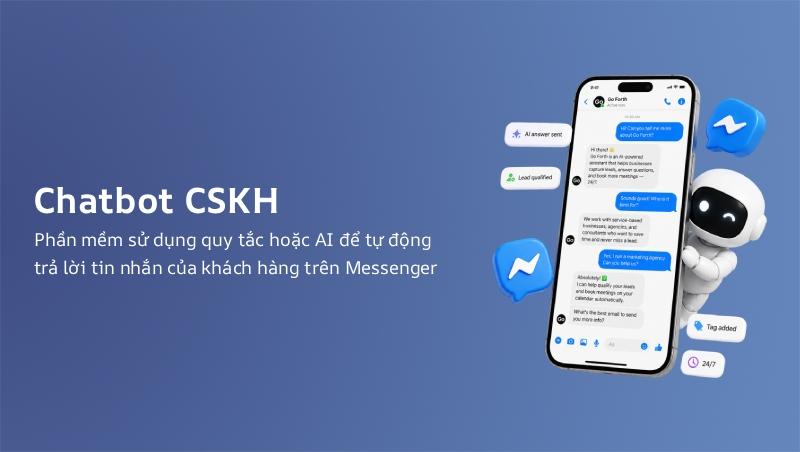
A customer care chatbot is a software program that uses rules or artificial intelligence to automatically reply to customer messages on Messenger. It can be programmed to understand questions, respond according to predefined scripts, collect information, and even support transactions.
Chatbot Levels
| Level | Description | Use Cases |
|---|---|---|
| Basic (Rule-based) | Responds based on keywords and predefined menus | FAQs, simple guidance |
| Advanced (Flow) | Multi-branch scripts based on customer choices | Product consultation, appointment booking |
| AI (NLP) | Understands natural language and learns from conversations | Complex support, smart recommendations |
| Hybrid | Combines chatbot with human handoff | Full-scale sales and support |
The Chatbot's Role in the Customer Journey
- Discovery stage: Reply instantly to the first message, projecting professionalism.
- Consultation stage: Recommend products, compare options, and answer questions from a script.
- Purchase stage: Close the sale, send payment links, and confirm orders.
- Post-sale stage: Run satisfaction surveys, provide usage guidance, and send periodic care messages.
Note: A chatbot can't fully replace humans. Always offer an "connect with an agent" option for complex requests — it keeps the experience smooth and shows genuine care.
How to Build an Effective Messenger Chatbot Script
A great chatbot script is the foundation of any successful Messenger Marketing campaign. A script is not just a set of answers — it's a purposefully designed conversation journey.
Step 1: Define the Chatbot's Goal
- Increase sales through online consultation.
- Reduce the workload of the customer care team.
- Capture leads and customer information.
- Provide product/service information.
A clear goal keeps your script focused and on point.
Step 2: List Frequently Asked Questions
Collect common questions from your sales team, fan page, and other channels. Group them into topics and prepare standard answers for each.
Step 3: Design the Conversation Flow
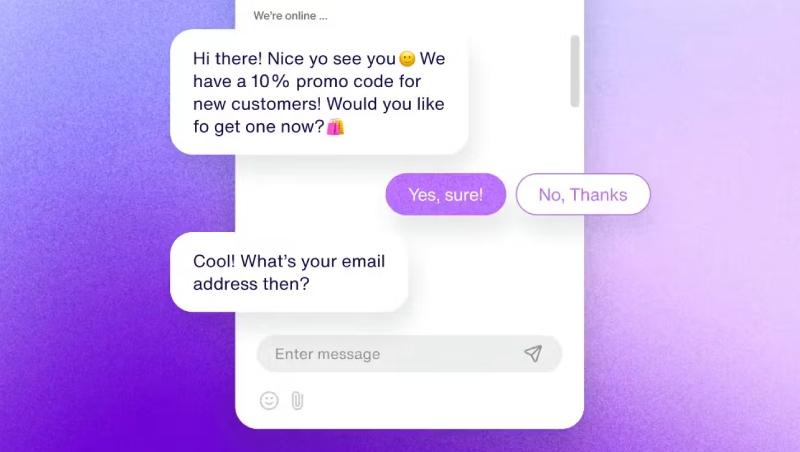
Every conversation needs a starting point, choice branches, and a destination:
Welcome message
    └── What do you need help with?
        ├── 1. Product consultation → recommend by need
        ├── 2. Pricing & promotions → current offers
        ├── 3. Place an order → completion steps
        └── 4. Other support → connect with an agent
Step 4: Write Natural Message Copy
- Keep messages short and to the point.
- Use a human tone, not a robotic one.
- Add Quick Replies so customers can tap to respond.
- Personalize with the customer's name and information.
Step 5: Connect the Chatbot to Ad Campaigns
Integrate the chatbot with Click-to-Messenger ads and Sponsored Messages to create an automated attract → consult → close loop. If you're just starting out, check our guide to Facebook ad optimization to combine them effectively.
Step 6: Test and Optimize Continuously
Run tests across many scenarios, monitor conversation completion and drop-off rates, and refine the script regularly.
Tools for Messenger Marketing
Choosing the right tool determines how quickly and effectively you can launch. Here are the most popular platforms:
ManyChat
The world's #1 Messenger Marketing tool, ideal for beginners thanks to its drag-and-drop interface.
- Pros: Free basic plan, rich template library, deep integration with Facebook Ads.
- Cons: Paid tiers grow in cost as your subscriber base grows.
Chatfuel
A long-established platform for building code-free chatbots on both Messenger and Instagram.
- Pros: Easy to use, with extension plugins available.
- Cons: Less deep customization than ManyChat.
Meta Business Suite Chatbot
A free built-in option within Meta Business Suite for basic auto-replies and quick responses.
- Pros: Free, pre-integrated, no extra installation.
- Cons: Limited features compared to dedicated tools.
SendPulse
An omnichannel platform supporting Messenger, email, and SMS with flexible pricing.
- Pros: Manage multiple channels in one system.
- Cons: The interface is more complex for beginners.
Tidio
A website chatbot with multichannel customer care, well suited to small and medium businesses.
- Pros: Strong website integration, centralized conversation management.
- Cons: More web-focused than Messenger-focused.
Tip: As your business grows, connect your Messenger chatbot to a CRM system and marketing automation tools to unify your entire customer care stack.
Messenger Marketing vs. Other Channels
| Criterion | Messenger Marketing | Email Marketing | Zalo OA |
|---|---|---|---|
| Open rate | 80% – 90% | 15% – 25% | 50% – 70% |
| Automation | 24/7 chatbot | Automated email sequences | Auto messages, scripts |
| One-on-one engagement | High, private | Low, one-way | High, private |
| Cost | Low | Low – medium | Low |
| Audience | Global Facebook users | Your own email list | Zalo users (mainly Vietnam) |
If most of your customers are in Vietnam, consider combining marketing on Zalo and Zalo OA for a multichannel approach. Each channel has its strengths, and a diversified strategy maximizes overall results.
A Step-by-Step Messenger Marketing Process
Step 1: Set Up the Foundation
- Switch your fan page to a Business Page.
- Enable Messenger and turn on the "Send Message" button.
- Install your chatbot tool and connect it to the fan page.
- Prepare a Welcome Message and an Away Message.
Step 2: Define Your Target Audience
Map out your customer personas, needs, and Messenger usage habits. Refer to the guide on identifying customer segments for a solid data foundation before building content.
Step 3: Build the Chatbot Script
Design the conversation flow around your chosen goal, write message copy, and set up the choice branches.
Step 4: Run Attraction Campaigns
- Use Click-to-Messenger ads to pull in new customers.
- Apply for Meta-approved tags (orders, events, etc.) to expand messaging rights.
- Invite customers to message from your fan page, posts, and Facebook engagement content.
Step 5: Automate Care and Sales
Run the chatbot around the clock to answer, consult, and close orders 24/7. Escalate complex conversations to human agents via the Handover Protocol.
Step 6: Measure and Optimize
Track the core KPIs and continuously improve scripts, content, and send timing.
Measuring Messenger Marketing Performance
Data is the key to optimizing your strategy. Track these metrics:
- Message open rate: How many people opened the message out of all recipients.
- Click-through rate (CTR): How many clicked links or buttons in the conversation.
- Conversation completion rate: How many customers reached the script's final destination.
- Conversion rate: Customers who completed the target action (purchase, lead submission).
- Cost per lead (CPL): The cost of acquiring one Messenger lead.
- Average response time: How fast your chatbot and team reply.
Note: Combine Messenger data with Google Analytics and your CRM to get a complete picture of the customer journey.
Common Messenger Marketing Mistakes to Avoid
Spamming Broadcast Messages
Sending broadcasts too often with low-value content makes customers block your page and report spam. Reduce frequency, raise quality, and only send to the right audience.
Overly Rigid Chatbot Scripts
A chatbot that answers around the subject or fails to understand questions creates a poor experience. Always design an exit path: connect to an agent or provide genuinely useful answers.
Ignoring Meta's Policies
Failing to respect the 24-hour window or misusing tags can cost you the right to send messages. Read the policies carefully and keep up to date.
Skipping Audience Segmentation
Sending the same message to everyone lowers performance and increases unsubscribes. Segment by behavior, interests, and journey stage.
Relying Entirely on the Chatbot
Letting the chatbot handle every situation, including sensitive complaints, frustrates customers. Humans still need to step in for delicate cases.
Messenger Marketing FAQs
Is Messenger Marketing suitable for small businesses?
Absolutely. With ManyChat's free plan and the built-in Meta Business Suite chatbot, even small stores can automate customer care at nearly zero cost.
How much does Messenger Marketing cost?
Costs have two parts: the chatbot tool (free tiers or roughly $10 – $50/month) and Click-to-Messenger ad budgets (flexible, from a few dollars a day). Overall it's far cheaper than many other channels.
Do I need to verify my fan page before using a chatbot?
You need an active fan page, but verification isn't required immediately for basic features. Some advanced features (expanded messaging rights, special tags) require Meta Business Verification.
Will customers be annoyed by promotional messages?
Not if the content is valuable and well targeted. Always respect customer choices, offer an unsubscribe option, and send only when genuinely helpful.
Can a chatbot fully replace customer care staff?
No. Chatbots handle repetitive questions and basic tasks well, but complex or sensitive situations need humans. A hybrid model (chatbot + staff) always delivers the best experience.
Does Messenger Marketing relate to SEO?
Indirectly, yes. Conversation content and fan pages aren't ranked directly on Google, but customer retention and brand engagement improve behavioral signals. Combined with internal linking and a content cluster strategy, it forms a closed-loop content-and-care marketing system.
Conclusion
Messenger Marketing has become one of the most effective marketing channels thanks to its superior open rates, personalization, and the automation power of chatbots. Combined with a strategy for building sustainable customer relationships, Messenger helps businesses not only grow sales but also earn long-term loyalty.
To succeed, you need clear goals, a professional chatbot script, strict compliance with Meta's policies, and continuous measurement and optimization. Don't treat the chatbot as just an auto-responder — make it part of a comprehensive customer care strategy, in sync with your other social media marketing channels.
Start small: set up a basic chatbot, run one Click-to-Messenger campaign, measure the results, and expand from there. Messenger Marketing will be a valuable competitive advantage for your brand in 2026 and beyond.
Comments
0 Comment(s)
Loading...
Latest Posts
Vung Tau Web Design for Tourism and Local Businesses
A Vung Tau web design guide for tourism, services, and B2B companies covering structure, features, costs, local SEO, delivery, and acceptance testing.

Quang Ngai Web Design for Tourism and Industry
Quang Ngai web design for Ly Son tourism, accommodation, local products, and Dung Quat B2B: structure, features, pricing, process, and QA checklist.

Ninh Binh Web Design for Tourism and Local Businesses
Ninh Binh web design for heritage tourism, accommodation, and businesses: content structure, features, pricing, local SEO, process, and acceptance checks.

Quang Binh Web Design for Tourism and Local Businesses
A Quang Binh web design guide for tourism, accommodation, and local businesses: structure, features, cost, local SEO, delivery process, and acceptance QA.
Related Posts

Virtual Office Website Design 2026: Complete Guide to Management, Booking & Pricing
Complete guide to designing a professional virtual office website in 2026. Office management system, meeting room booking, pricing tables, service showcase, SEO optimization, and implementation checklist for virtual office providers and coworking spaces.

Watch Shop Website Design 2026: Catalog, E-commerce, Pricing And Detailed Costs
Watch shop website design 2026 — how much does it cost? Detailed analysis of product catalog features, e-commerce, pricing, actual costs and implementation checklist to help watch shops build effective online sales channels.

Pharmacy Website Design 2026: Complete Guide to Online Drug Ordering, Inventory Management & Pricing
Complete guide to designing a professional pharmacy website in 2026. Online drug ordering, inventory management, pricing tables, service showcase, SEO optimization, and implementation checklist for pharmacies and drugstores.

Jewelry Shop Website Design 2026: Gallery, E-commerce, Pricing And Detailed Costs
Jewelry shop website design 2026 — how much does it cost? Detailed analysis of product gallery features, e-commerce, pricing, actual costs and implementation checklist to help jewelry shops build effective online sales channels.
