
What is Content Cluster? Complete Guide to Building Pillar Pages for SEO in 2026
- Published on






What is Content Cluster?
Content Clusters is a content organization strategy where one central piece of content (called a Pillar Page) serves as the foundation, surrounded by more detailed content pieces (called Cluster Content) that address related questions and support building topical authority for your website.
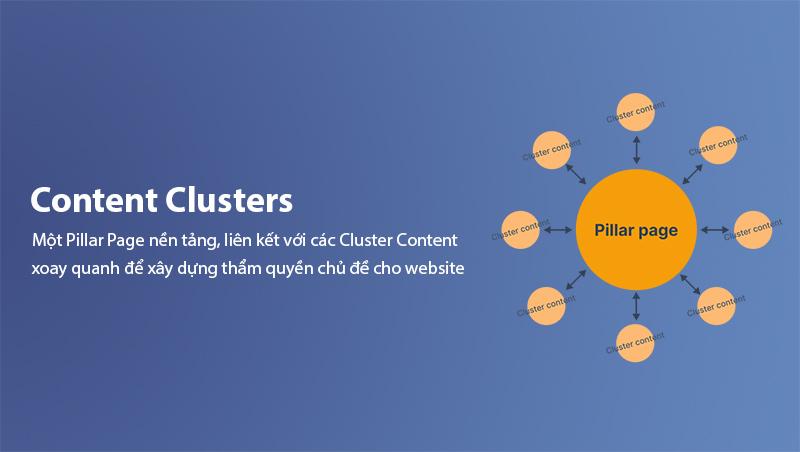
This concept stems from the principle that modern Google doesn't just evaluate individual articles—it looks at your entire content ecosystem to determine how deep your expertise is in a particular field. When you build a complete content cluster, Google recognizes that your website has comprehensive knowledge in that area, which increases authority and improves rankings across all cluster content.
Difference Between Pillar Page and Cluster Content
To understand what content clusters are, you need to distinguish between the two core components:
| Component | Definition | Example |
|---|---|---|
Pillar Page (Hub) | Comprehensive overview covering the entire topic | "What is Search Intent?" |
Cluster Content (Spoke) | In-depth content on specific aspects | "4 Types of Search Intent" |
Pillar Pages are typically 2,000-5,000 words and cover all aspects of the topic, while Cluster Content is usually shorter (500-1,500 words) but goes deep into one specific aspect. Both are connected through Internal Link, creating a complete content network.
Why Content Clusters Matter in SEO
1. Building Topical Authority
Topical Authority is a critical factor in modern SEO. When you build a complete content cluster about a topic, Google recognizes that your website has deep expertise in that field.
For example, if you want to rank for "SEO", you need more than just one article about SEO. You need a complete system including:
- SEO overview article
- SEO Onpage article
- SEO Offpage article
- Search Intent article
- Internal Link article
- Backlink article
When all these articles are interconnected, Google understands that your website is a comprehensive resource for SEO, increasing trust and overall rankings.
Important Note: Topical Authority isn't built overnight. You need to consistently publish cluster content for at least 3-6 months for Google to highly value your website.
2. More Keyword Ranking Opportunities
Each Cluster Content targets a different specific keyword. Instead of writing one long article covering everything, you can rank for dozens of keywords simultaneously by distributing content across multiple articles within the same cluster.
Suppose you write a Pillar Page about "Content Marketing". Your cluster content can rank for:
- "What is content marketing"
- "Content marketing strategy"
- "How to build content"
- "Content marketing examples"
- "Content marketing trends 2026"
3. Improved User Experience
Content clusters not only benefit SEO but also provide an excellent user experience. When someone reads about a topic, they can easily navigate to more detailed articles through Internal Link, increasing dwell time and reducing Bounce Rate.
This is why many authoritative websites use this strategy, including Ahrefs, Moz, and HubSpot.
4. Supporting E-E-A-T
E-E-A-T (Experience, Expertise, Authoritativeness, Trustworthiness) is crucial in Google's evaluation, especially for YMYL (Your Money or Your Life) websites. A complete content cluster demonstrates that you have experience and deep expertise in your field, increasing trustworthiness in Google's eyes. To learn more about E-E-A-T, check out our article What is E-E-A-T.
How to Build Pillar Pages for SEO
See also: If you're not yet clear on the concept of a content pillar, read What is Content Pillar? before diving into the detailed process below.
Step 1: Research and Identify Pillar Topic
Before building a Pillar Page, you need to identify a suitable Pillar Topic:
Pillar Topic Selection Criteria:
- Search Volume: Meaningful search volume (medium+ volume)
- Commercial Value: Aligns with your business goals
- Scarbility: Broad enough to create multiple cluster content, but narrow enough to cover in-depth
How to Find Pillar Topics:
- Use tools like Ahrefs, SEMrush, or Ubersuggest
- Find high-volume keywords in your niche
- Analyze questions (People Also Ask, Related Searches)
- Identify topics that can expand into multiple articles
Step 2: Build Cluster Content
After identifying the Pillar Topic, you need to build Cluster Content:
Methods to Identify Cluster Content:
-
Analyze user questions:
- Use AnswerThePublic, AlsoAsked, or People Also Ask
- Collect questions starting with "How", "Why", "What"
- Group questions by sub-topic
-
Analyze related keywords:
- Use keyword research tools to find Long-tail Keywords
- Each long-tail keyword can become a Cluster Content
-
Analyze competitors:
- See what top-ranking websites have for your Pillar Topic
- Identify content gaps
Real Example:
Suppose your Pillar Topic is "Content Marketing". Cluster content might include:
- "What is Content Marketing?"
- "Effective Content Marketing Strategy"
- "How to Build a Content Calendar"
- "Types of Content in Marketing"
- "Measuring Content Marketing Success"
- "Content Marketing Trends 2026"
Step 3: Write the Pillar Page
Standard Pillar Page Structure:
1. Title Tag: [Pillar Topic] - Complete Guide [Year]
2. Meta Description: 150-160 character summary
3. H1: [Pillar Topic is what?]
4. Introduction: Overview of the topic
5. Main sections (H2):
   - Definition
   - Why it matters
   - Types/Categories
   - Detailed guide
   - Real examples
   - Common mistakes
   - Conclusion
6. Internal Link: Link to all Cluster Content
Content Requirements for Pillar Pages:
- Clear definition: Readers should understand the Pillar Topic from the start
- Detailed explanation: Cover all aspects of the topic
- Real examples: Illustrate with specific examples
- Actionable guidance: Readers can apply immediately
- Internal Link: Link to related Cluster Content
Step 4: Write Cluster Content
Cluster Content Structure:
1. Title: Specific name of the aspect to cover
2. H1: [Specific aspect]
3. In-depth content about that aspect
4. Internal Link: Link back to Pillar Page and other Cluster Content
Cluster Content Writing Principles:
- Write in-depth about one specific aspect, don't ramble
- Use specific data and examples
- Ensure content meets user search intent
- Link back to the Pillar Page for connection
- Use TF-IDF to optimize content naturally, avoiding keyword stuffing. To learn more about TF-IDF, check out our guide on What is TF-IDF.
Step 5: Set Up Internal Links
Internal Link Strategy in Content Clusters:
-
From Cluster Content to Pillar Page:
- Each Cluster Content should have at least 1 link to the Pillar Page
- Anchor can be: "comprehensive guide about [Pillar Topic]"
-
From Pillar Page to Cluster Content:
- Pillar Page should link to all Cluster Content
- Links should be placed in relevant sections
-
Between Cluster Content:
- Cluster Content can link to each other if related
- This creates a tight content network
Internal Link Examples:
In the article "What is Search Intent?" (Pillar Page):
Instead of creating scattered content, organize content into content clusters with a central pillar content.
In the article "4 Types of Search Intent in SEO" (Cluster Content):
To learn more about this strategy, you can read the comprehensive guide about What is Search Intent?. Additionally, learn more about Internal Link to build an effective linking system.
Types of Content Clusters
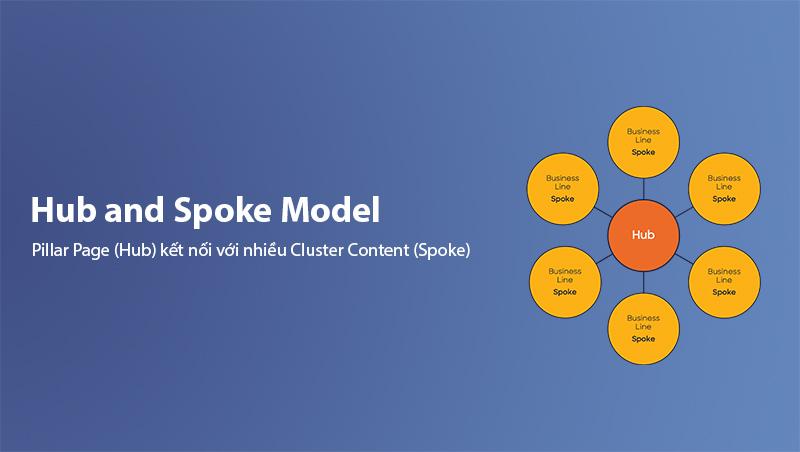
1. Hub and Spoke Model
This is the most popular model, where the Pillar Page (Hub) connects to multiple Cluster Content (Spokes):
Example:
- Hub (Pillar): "What is SEO? Complete Guide"
- Spoke (Cluster):
- "What is SEO Onpage?"
- "What is SEO Offpage?"
- "What is Search Intent?"
- "What is Keyword Research?"
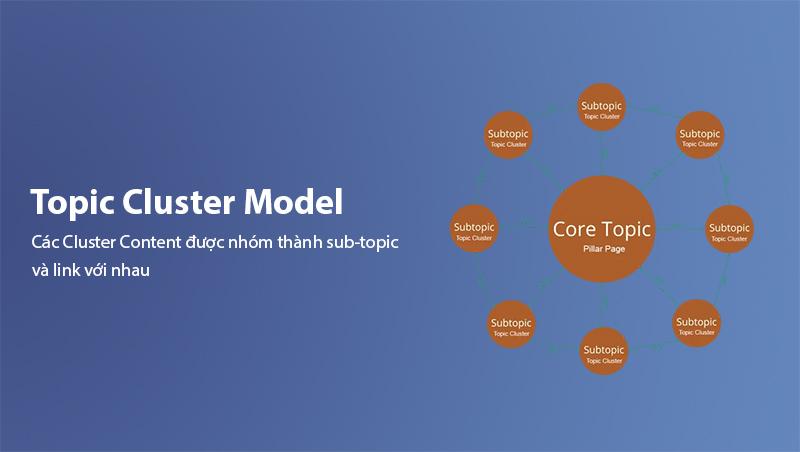
2. Topic Cluster Model
In this model, Cluster Content is grouped into sub-topics and links to each other:
Example:
- Pillar: "Content Marketing"
- Sub-topic 1: Strategy (Cluster Content about strategy)
- Sub-topic 2: Creation (Cluster Content about content creation)
- Sub-topic 3: Distribution (Cluster Content about distribution)
- Sub-topic 4: Analytics (Cluster Content about measurement)
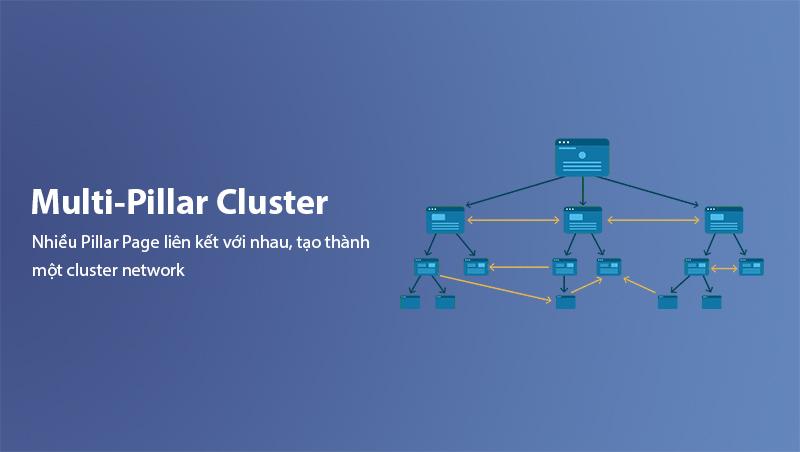
3. Multi-Pillar Cluster
In some cases, multiple Pillar Pages can link to each other, creating a cluster network:
Example:
- Pillar A: "Digital Marketing"
- Pillar B: "SEO"
- Pillar C: "Content Marketing"
All three can link to each other since they're all in the Digital Marketing field.
Optimizing Content Clusters for SEO
1. Optimize Title and Meta Description
Each article in the cluster needs optimized title and meta description:
Optimized Title:
- Include primary keyword
- Attractive, click-worthy
- Correct length (50-60 characters)
Optimized Meta Description:
- Briefly describe content
- Include call-to-action
- Correct length (150-160 characters)
2. Optimize Heading Structure
Use logical heading structure:
- H1: Main title (only 1 H1 per page)
- H2: Main sections
- H3: Subsections
Check out our guide on heading tags for SEO to optimize your content cluster articles.
- H4: Details (if needed)
Example:
# What is Content Cluster? (H1)

## Why Content Clusters Matter (H2)

### Building Topical Authority (H3)

### More Ranking Opportunities (H3)

## How to Build Pillar Pages (H2)

### Step 1: Research Pillar Topic (H3)

### Step 2: Build Cluster Content (H3)
3. Optimize Images
Use quality images and optimize:
- Alt text: Describe images with keywords
- File name: Use meaningful names (content-cluster-example.jpg)
- Size: Compress images under 100KB
- Format: Use WebP or AVIF
4. Optimize Internal Links
Internal Link Principles in Content Clusters:
- Reasonable quantity: Not too many, not too few (average 3-5 links per article)
- Diverse anchor text: Use different types of anchors
- Link to important content: Prioritize linking to Pillar Page and important articles
- Contextual links: Place links in appropriate context
Anchor Text Types:
| Type | Example |
|---|---|
| Keyword | "search intent", "content clusters" |
| Natural | "this strategy", "this method" |
| CTA | "learn more", "read more" |
| Naked URL | /blog/what-is-search-intent |
Common Mistakes in Building Content Clusters
1. Writing Too Many Cluster Content at Once
Mistake: Trying to write 20-30 articles at once, leading to low-quality content.
Solution: Build gradually, start with 5-7 articles, then expand.
2. Cluster Content Too Short
Mistake: Writing Cluster Content only 200-300 words, not providing enough value.
Solution: Each Cluster Content needs at least 500 words and genuinely solves reader problems.
3. No Internal Links
Mistake: Writing independent articles without connecting them.
Solution: Always ensure each article has at least 2-3 internal links to other articles in the cluster.
4. Not Updating Content
Mistake: Writing once and never updating.
Solution: Regularly review and update articles in the cluster (every 3-6 months).
5. Choosing Too Broad Pillar Topic
Mistake: Choosing overly broad Pillar Topics like "Marketing", difficult to cover in-depth.
Solution: Choose Pillar Topics broad enough for multiple clusters but narrow enough for in-depth coverage ("Content Marketing for SaaS").
Tools for Building Content Clusters
1. Keyword Research Tools
| Tool | Features |
|---|---|
| Ahrefs | Keyword analysis, Content Gap |
| SEMrush | Topic Research, Keyword Magic |
| Ubersuggest | Content Ideas, Keyword Tracking |
| AnswerThePublic | Find user questions |
2. Content Management Tools
| Tool | Features |
|---|---|
| Notion | Content calendar management |
| Airtable | Content database |
| Google Sheets | Progress tracking |
3. Analytics Tools
| Tool | Features |
|---|---|
| Google Analytics | Traffic tracking |
| Google Search Console | Ranking tracking |
| Screaming Frog | Internal link analysis |
Conclusion
What is Content Cluster? It's a content organization strategy with interconnected elements, helping build topical authority and improve overall SEO rankings. Building a complete content cluster requires:
- Thorough research to identify suitable Pillar Topic
- Strategy development for surrounding Cluster Content
- High-quality content that meets search intent
- Proper internal linking between articles
- Regular updates to maintain competitiveness
Start with one Pillar Topic and gradually build clusters around it. After 3-6 months of consistency, you'll see significant improvements in your website's rankings and traffic.
To learn more about effective content strategies, you can explore articles about Search Intent and Internal Link on our website.
Related tags:
Content ClustersPillar PageSEOContent StrategyTopical AuthorityContent MarketingInternal LinkComments
0 Comment(s)
Loading...
Latest Posts

Vung Tau Web Design for Tourism and Local Businesses
A Vung Tau web design guide for tourism, services, and B2B companies covering structure, features, costs, local SEO, delivery, and acceptance testing.

Quang Ngai Web Design for Tourism and Industry
Quang Ngai web design for Ly Son tourism, accommodation, local products, and Dung Quat B2B: structure, features, pricing, process, and QA checklist.

Ninh Binh Web Design for Tourism and Local Businesses
Ninh Binh web design for heritage tourism, accommodation, and businesses: content structure, features, pricing, local SEO, process, and acceptance checks.

Quang Binh Web Design for Tourism and Local Businesses
A Quang Binh web design guide for tourism, accommodation, and local businesses: structure, features, cost, local SEO, delivery process, and acceptance QA.
Related Posts

Local SEO for Buon Ma Thuot Businesses: A Complete Guide (2026)
A comprehensive Local SEO guide for businesses in Buon Ma Thuot — Google Business Profile optimization, local landing pages, Zalo/Messenger integration, local link building from BMT directories, and measuring results.

SEO Cost 2026: How Much Does SEO Service Cost Per Month?
How much does SEO cost per month in 2026? SEO service pricing by package from 1–5 million VND, cost factors, DIY vs hiring an agency and a checklist before signing a contract.

What is Content Pillar? SEO Content Strategy Guide 2026
Discover what a Content Pillar is and how to build an effective SEO content strategy. A detailed guide covering pillar characteristics, structure, the creation process, and KPI tracking for your website in 2026.

What is Wix SEO? How to Optimize a Wix Website for Google Rankings
What is Wix SEO? A complete guide to optimizing your Wix website across technical SEO, on-page optimization, content strategy, Wix SEO Tools, schema markup, and Google Search Console. Help your Wix site rank higher on Google in 2026.
